Overview
If you are not receiving notifications from the Centegix Mobile App, there are several steps you can take to troubleshoot and ensure your account is functioning properly.
This article outlines common causes and provides step-by-step instructions to run a diagnostic test within the app.
Important: New or Replacement Mobile Device
If you receive a new mobile phone and install the Centegix Mobile App:
- You must log out of the app on your old device (if applicable).
- You may need to reset/update your password.
- You must log back into the app on the new device.
Failure to properly log out and log back in can prevent push notifications from working correctly.
Run an App Diagnostic Test
The Centegix Mobile App includes a built-in diagnostic tool that allows you to verify your app registration and notification functionality.
If you suspect your app is not working properly, we strongly recommend running a diagnostic test.
Best Practice: All staff utilizing the Centegix Mobile App should conduct a monthly diagnostic check to ensure their account remains healthy and properly registered.
How to Run a Diagnostic Test
- Open the Centegix Mobile App
- Tap the Gear icon in the upper-right corner
- Select Settings
- Tap the Support tab
App Diagnostics
Select “App Diagnostics” to run a quick check across three critical categories related to alert delivery.
If a failure is detected:
- Open the Centegix app
- Go to Profile & Settings
- Select Sign Out
- Close the app
- Reopen the app and sign back in
- Run App Diagnostics again
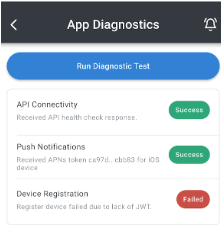
If You See “Device Registration Failed”
- This message indicates that your device is not properly registered with the CENTEGIX system.
- To fix this:
- Update your CENTEGIX password.
- Sign out and sign back in to the CENTEGIX app with your new password.
- Re-run the diagnostic test to confirm the issue is resolved.
If the diagnostics still show an error, please contact: PBSD Technology Department techsupport@pbsd.net
Additional Resources
- Centegix Mobile App FAQs: https://www.centegix.com/mobile-app-faq/
- Centegix Mobile App Troubleshooting Guide: https://success.centegix.com/article/540-mobile-app-faqs
- Related Article: Centegix Mobile App: Setup Instructions
Need Assistance?
If you have any questions or require additional support, please contact: PBSD Technology Department techsupport@pbsd.net
Was this article helpful?
That’s Great!
Thank you for your feedback
Sorry! We couldn't be helpful
Thank you for your feedback
Feedback sent
We appreciate your effort and will try to fix the article